|
Submitted on June 27, 2002
An article on a small managed C++ class which gives ability to use the "Send To" feature of Windows Explorer.
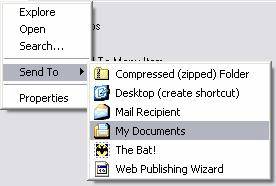
In one of the applications I have created is a 'Send To' menu class using MFC which displays a list of the user's 'Send To' extensions and sends a file to the extension the user selects. Now I tried to write a Microsoft .NET assembly and I chose the 'Send To' menu class as stuff for the assembly. WARNING: The assembly source code may contain errors. Use the source code of the assembly at your own risk.
Visually the 'Send To' menu is a menu containing menu sub-items with the graphical representation of the user's 'Send To' extensions. The sub-items can be both with and without bitmaps.
The 'Send To' menu class is a descendant of the System.Windows.Forms.MenuItem class and contains the following new public properties and methods:
// [C#]
public bool EnableBitmap [ get, set ]
public void Replace ( System.Windows.Forms.MenuItem menuItem , System.EventHandler eventHandler )
public void Restore ( ) |
' [Visual Basic]
Public Property EnableBitmap As Boolean
Public Sub Replace(ByVal menuItem As System.Windows.Forms.MenuItem, ByVal eventHandler As System.EventHandler)
Public Sub Restore() |
  EnableBitmap EnableBitmap |
 Gets or sets a value indicating whether the subitems have bitmaps. Gets or sets a value indicating whether the subitems have bitmaps. |
  Replace Replace |
Replaces an existing menu item by a Send To menu item |
|
Restore |
Restores the menu item which is replaced by the Replace method |
You can use the given class in two ways. The first one is to replace an existing menu item and the second one is to add a new 'Send To' menu item to the application menu manually. Use the first method if you design an application menu using the designer, and the second one - if you create an application menu manually.
To replace an existing menu item you have to:
- Declare a form variable based on the SentToMenuItem class.
// [C#]
private megaBYTE.SendToMenuItem menuItemSendTo;
' [Visual Basic]
Friend WithEvents MenuItemSendTo As megaBYTE.SendToMenuItem |
- Create an instance of the SentToMenuItem class.
// [C#]
menuItemSendTo = new megaBYTE.SendToMenuItem();
' [Visual Basic]
Me.MenuItemSendTo = New megaBYTE.SendToMenuItem() |
- If it is necessary set the EnableBitmap property.
// [C#]
menuItemSendTo.EnableBitmap = false;
' [Visual Basic]
Me.MenuItemSendTo.EnableBitmap = False |
// [C#]
menuItemSendTo.Replace(menuItemSendToStub, new EventHandler(menuItemSendToStub_Click));
' [Visual Basic]
Me.MenuItemSendTo.Replace(Me.MenuItemSendToStub, New EventHandler(AddressOf Me.MenuItemSendToStub_Click))
|
The most interesting is point 4. The first parameter of the Replace method is the item to be replaced and the second parameter is a new instance of the EventHandler class. The parameter of the EventHandler class constructor is the click event handler of the replaced item. The click event handler method looks like
// [C#]
private void menuItemSendToStub_Click(object sender, System.EventArgs e)
{
if (e.GetType() == typeof(megaBYTE.SendToClickEventArgs))
{
OpenFileDialog dlg = new OpenFileDialog();
dlg.CheckFileExists = true;
if (dlg.ShowDialog() == DialogResult.OK)
{
megaBYTE.SendToClickEventArgs se = (megaBYTE.SendToClickEventArgs)e;
se.FileName = dlg.FileName;
}
}
}
' [Visual Basic]
Private Sub MenuItemSendToStub_Click(ByVal sender As System.Object, ByVal e As System.EventArgs) Handles MenuItemSendToStub.Click
If TypeOf e Is megaBYTE.SendToClickEventArgs Then
Dim dlg As New OpenFileDialog()
dlg.CheckFileExists = True
If dlg.ShowDialog = DialogResult.OK Then
Dim se As megaBYTE.SendToClickEventArgs
se = CType(e, megaBYTE.SendToClickEventArgs)
se.FileName = dlg.FileName
End If
End If
End Sub
|
If you are going to add the 'Send To' menu manually just use the SendToMenuItem class as the System.Windows.Forms.MenuItem class.
The assembly source code contains parts of the Microsoft SENDTO sample.
Alexey Sinutin.
Please write to stmi@hotbox.ru
| 













