













Hashing FTP user passwords |
||

| ||
|
Submitted on February 26, 2005 IntroductionWhen implementing an FTP server, it is important to keep the user accounts information secured. In most Delphi FTP Server components information about the user passwords comes as a clean text. The task of the encoding and encrypting of the password information should be solved by the end-user when implementing the FTP server application. This article demonstrated a sample of storing passwords as MD5 hash values. As an example, let's take the TclFtpServer component from the Internet Components - Clever Internet Suite v 5.0 library. Also you can apply this approach to the TIdFTPServer component from Indy9 or Indy10 by http://www.indyproject.org/ . In case of using Indy10 the task of validating FTP passwords is simplified since this version of the TIdFTPServer supports the MD5 (and also MD4 and SHA1) OTP (One Time Password) authentication method. Calculating of the password hashThe password hash can be calculated by using the standard Microsoft Crypto Api library. The sample code which implements the MD5 hashing algorithm can be seen below:
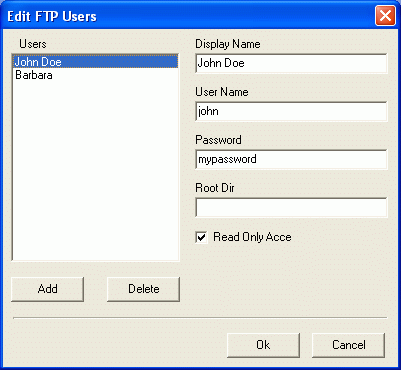
You can choose the used hash algorithm specifying the corresponding parameter for the CryptCreateHash CryptoApi function. The number of supported algorithms depends on the cryptographic provider being used. You can learn more about cryptographic providers and supported algorithms from the MSDN Microsoft Knowledge base. Storing the hashed passwordLet's go ahead and consider a task of modifying user accounts at the FTP server side.
Using the Edit Box above you can create new users and also modify existing ones. Please note, we cannot see the passwords for the users which have been created previously since their password information is represented by the cryptographic hash. This approach is implemented in most professional systems including MS Windows User accounts. The code-behind for this dialog looks trivial except for two methods: loading and storing the account details. Since we cannot see passwords for existing users, we must keep all password hashes, which have been entered previously:
This method copies the user accounts to the temporary accounts collection in order to edit it with the Edit Box. We must clean the password values for all users from temporary accounts collection for separating users which are already exist from newly created users.
This method synchronizes the user accounts from the temporary FAccounts collection with the ones available on the FTP server. We cannot call the Assign method for the entire collection. In such case we can lose the password hashes calculated during the previous session of editing FTP accounts. Validating the password hashWhen a FTP client is about to connect to the FTP server, it provides both the user name and the password information by using the 'USER' and 'PASS' commands correspondingly. In case of using the OTP approach for sending-receiving password values, the password value comes from a client as a calculated MD4, MD5 or SHA1 hash value. In such a case we do not need to do anything for preparing the retrieved password before validating it. But in case of sending passwords as a clean text, it is necessary to apply the same hash algorithm as the one used for storing the user accounts collection. In case of using the TclFtpServer from Internet Components - Clever Internet Suite v 5.0, the default password validation algorithm can be overridden using the OnAuthenticate component event. The event handler for the OnAuthenticate component event looks like the following:
Source Code and working sampleA full source code of all classes described in this article can be downloaded at FtpServer.zip This code is constantly refined and improved and your comments and suggestions are always welcome. With best regards, |
 Copyright © 2000-2026